



New features in version 5.5 of the Member Tools app can help you fulfill your callings more effectively from the convenience of a mobile device.
Improvements to Class and Quorum Attendance
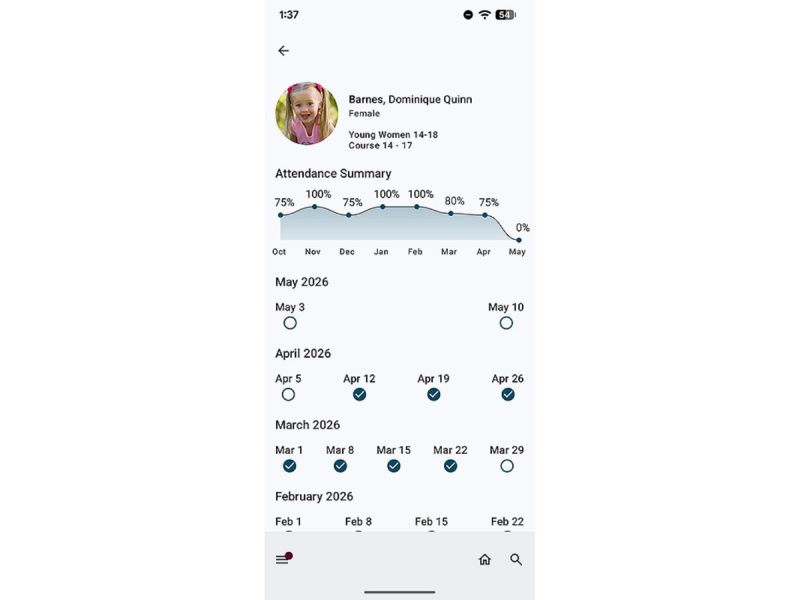
Class teachers and organization leaders can now record teacher attendance right alongside children and youth attendance, making the process faster and easier. By default, teachers will automatically see only their assigned weeks for a streamlined experience. Plus, they can get a quick, at-a-glance view of class attendance summaries to better support and minister to class members.
Quarterly Report
The quarterly report (available in both Leader and Clerk Resources (LCR) and the Member Tools app) organizes attendance into categories that can help leaders identify needs and minister more intentionally. For example, you can see a list of individuals who attend church regularly, prospective elders who have attended Sunday School this quarter, and youth with a current temple recommend.
- From the Menu, navigate to Reports and tap Quarterly Report.
Custom Member Lists
Member Lists, formerly called Groups, are a great way to organize custom groups of people who you want to contact regularly but who may not be organized under Organizations. For example, you can create unique lists, such as people on your ward council, members who volunteered to be substitute teachers, members who live nearby, or parents of children in a Primary class. All lists are private and for your personal use.
- Apple iOS: From the Menu, navigate to Member Lists, tap the plus icon (+) and name your group. To add people, tap on your new group name, then tap the plus icon (+) to see your unit directory. To add people from another unit in your stake or district, tap the three dots at the top, then tap the unit’s name, and a drop-down menu will appear with additional options.
- Android: From the Menu, navigate to Member Lists, tap the plus icon (+), and name your group. To add people, tap on your new group name, then tap the three dots in the right corner, select Edit, and search for the names of members you want to add.
Account Support
You can configure your Church account settings by visiting account.ChurchofJesusChrist.org. Here, you can manage the visibility of personal details, subscribe to emails from the Church, and manage a loved one’s account.
If you need help creating or recovering your Church account, visit account.ChurchofJesusChrist.org/recovery.
The post New Member Tools Features Help You Serve More Effectively first appeared on LDS365: Resources from the Church & Latter-day Saints worldwide.
Continue reading at the original source →